Reports
Know what your house really earns
Occupancy, average room price and revenue per available room, split by source and category. You see which channel pays and which month needs a push.
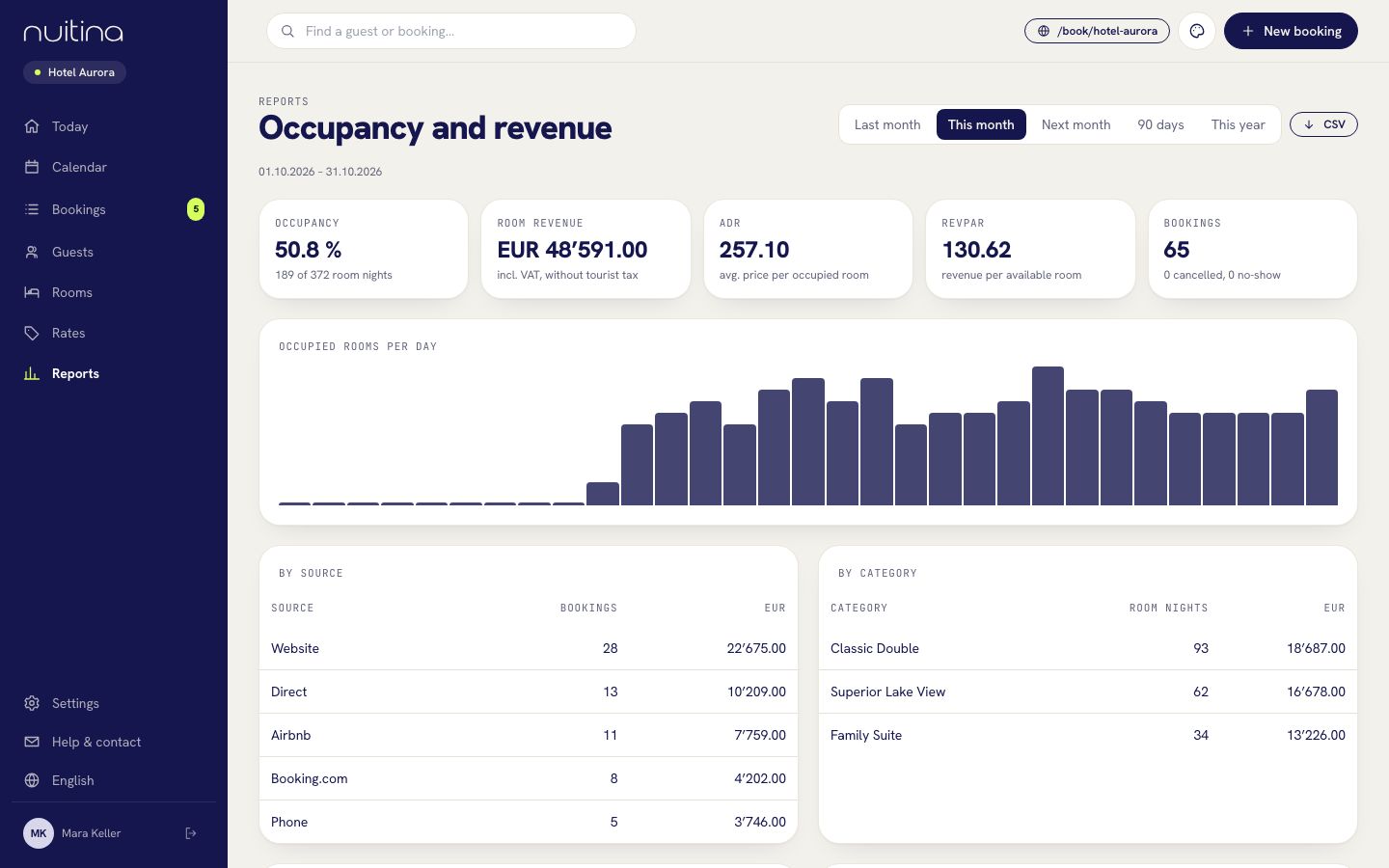
The numbers you get
Occupancy
How many of your available room nights were booked, shown as a percentage and as a count, for the period you choose.
Average room price
The average price per occupied room, so you can tell a full house at low prices from a half-full one at good prices.
Revenue per available room
Room revenue divided by all rooms you could have sold, the figure hoteliers use to compare months and years.
By source and category
Direct, portal or phone: see which source brings how many bookings and room nights, and which room category earns the most.
Cancellations and no-shows
A count of cancelled bookings and no-shows next to the confirmed ones, so the totals stay honest.
Tourist tax and VAT
Tourist tax is shown apart, because it is passed on and is not revenue. The VAT in your revenue is listed as an aid for your VAT return.
How to use them
Pick a period
Choose last month, this month, next month, 90 days or this year under Reports.
Read the picture
Look at occupancy per day, then at the split by source. A source that fills the house but at a low price shows up at once.
Hand it to the accountant
Export the figures as CSV and send them on. Nuitina has no connection to accounting software at the moment, and the invoices are made inside Nuitina.
Price suggestions
Nuitina looks at how full your house is in the coming weeks and suggests price changes. Nothing happens by itself: when you press Apply, ordinary price rules are created that you can see and delete again under Rules in Rates.
It is a prompt for your own judgement, not an automatic revenue manager.
The VAT overview helps you prepare the VAT return. It is not bookkeeping and does not replace your accountant.
Questions people ask
What is revenue per available room?
It is your room revenue divided by every room night you had available, whether sold or not. It shows what each room earned on average, including empty nights.
Can I export the data?
Yes, as CSV, for your accountant or your own spreadsheet.
Is tourist tax part of the revenue?
No. It is shown separately because it is passed on to the municipality. Room revenue includes VAT but not tourist tax.
Do the price suggestions change my prices automatically?
No. You decide, and you can delete any rule they create.
Related
Tourist tax, VAT, invoices
Enter VAT and tourist tax once in Settings → Property, see how they show on the guest's price and on invoices, and print an invoice and the registration form.
Read moreHow a small hotel gets more direct bookings
Ten practical ways a small hotel or B&B can win more direct bookings and pay less commission to booking portals.
Read moreRooms and prices
Add room categories, rooms and photos, then set base prices, seasons, weekends, minimum stay, stop-sell, tariffs and extras.
Read moreSee your own numbers
Start the free 30-day trial and read your first report. No card needed.