Set up tourist tax and VAT, then print invoices
At the end your guests see the tourist tax as its own line, your invoices carry your company details and the VAT contained, and you can print an invoice and a registration form in two clicks. About 15 minutes.
Before you start. Nuitina does not know which rates or duties apply to your house. Ask your accountant or your municipality for your VAT rates and your tourist tax, then enter them as they tell you. Look at your first invoice together with your accountant.
Enter your details
Open the property settings
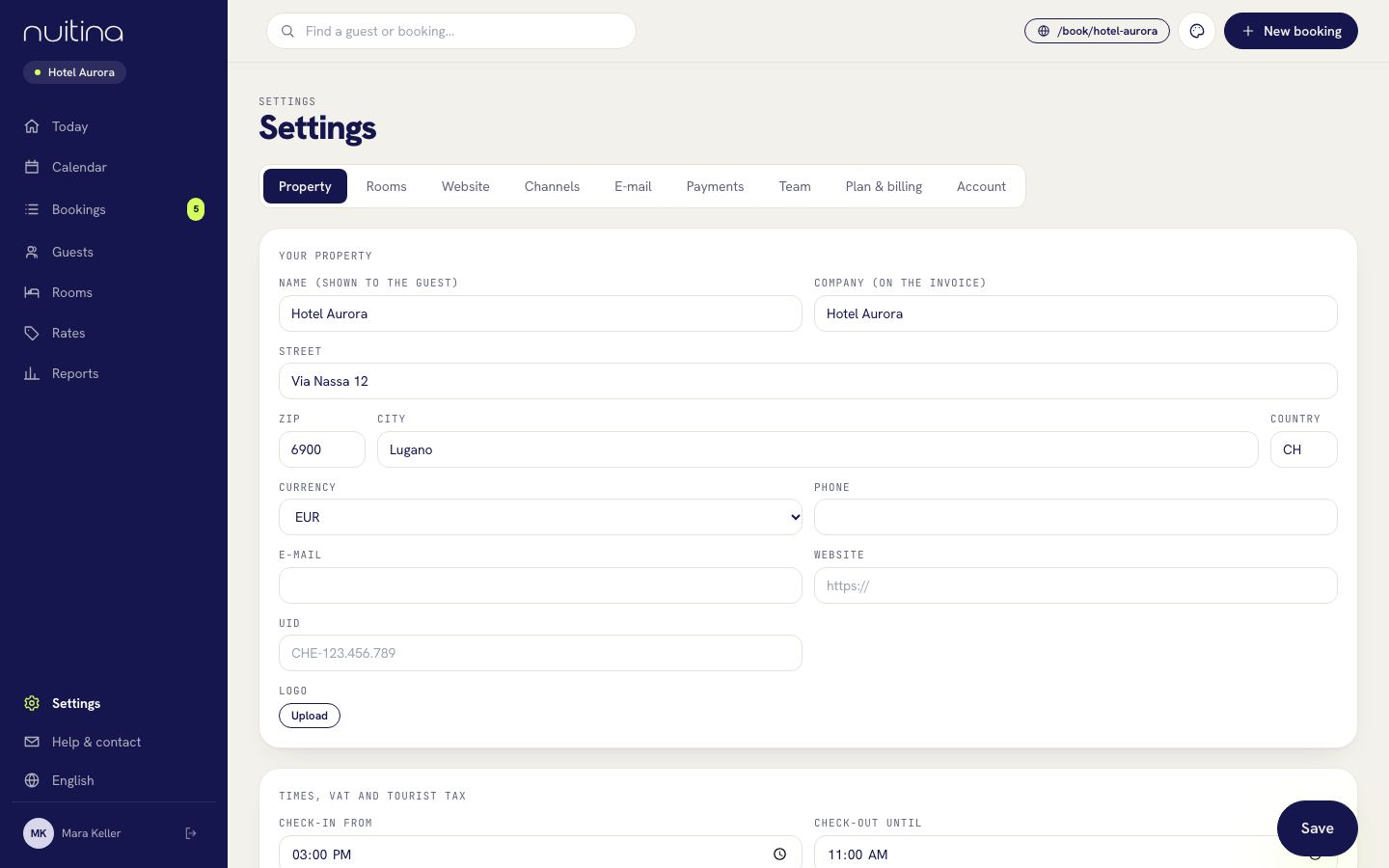
Sign in as owner or manager and open «Settings → Property».
Fill in the invoice header
Under «Your property» enter the name shown to the guest, the «Company (on the invoice)», street, postcode, city, phone, e-mail and «UID». Upload your «Logo»: it appears on the invoice.
Enter VAT
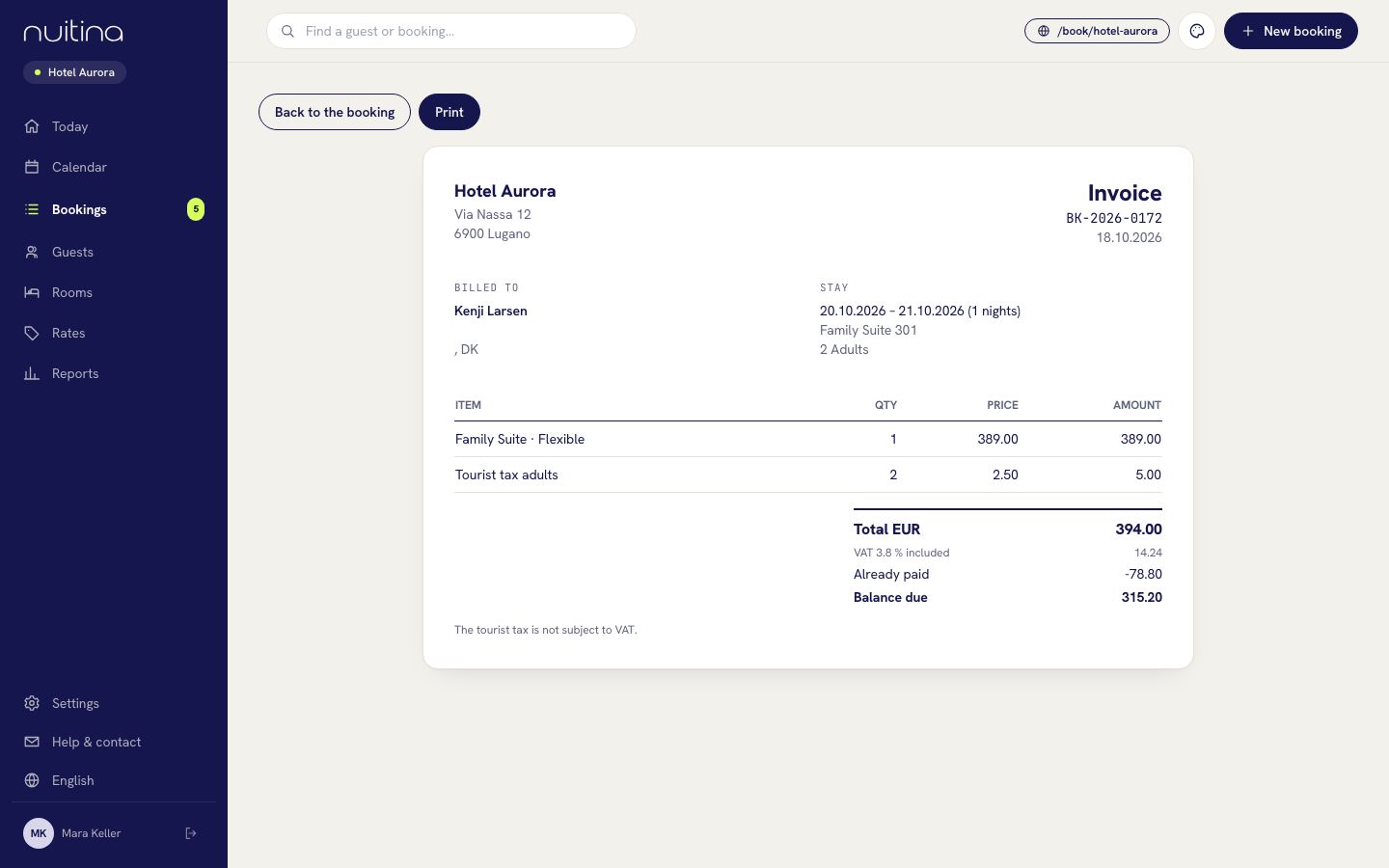
Under «Times, VAT and tourist tax» switch on «The property is liable for VAT» if that applies to you. Then enter your «VAT number», the «VAT rate accommodation %» and the «VAT standard rate %». Prices stay gross. Invoices show the VAT contained.
Enter the tourist tax
Type the amount per night under «Tourist tax per adult and night» and «Tourist tax per child and night». 0 means none. The tax is added on top of the room price and carries no VAT.
Add your payment details
Under «Online booking» fill in «Payment details», for example your IBAN. It appears on invoices that still have a balance due.
Set the VAT rate of extras
In «Rates → Extras» edit each extra and choose its «VAT rate»: accommodation or standard rate. Then click «Save» on the property page.
How it appears to the guest
On your booking page, and in the price summary of every booking, the tourist tax shows as its own line, for adults and children. If you are liable for VAT, the price summary adds a line such as «incl. VAT» with the amount contained in the gross price. Room prices themselves never change when you enter VAT.
Print an invoice and the registration form
Open the booking
Open «Bookings» and click the booking. Check that the guest's address and, for a company, the «Company (optional)» name are filled in; they print on the invoice.
Open and print the invoice
Click «Invoice» at the top. The page shows the lines, the total, the VAT contained per rate and what is already paid. Click «Print», then choose your printer or «Save as PDF» in the browser's print window. The invoice number is the booking number, and its date is the day the booking was created.
Print the registration form
On the booking click «Registration form», then «Print». It lists the guest's details and the stay, with lines for companions, place and date, and the guest's signature. Details the guest entered through online check-in are already filled in.
Questions people ask
Does Nuitina tell me my VAT rate or tourist tax?
No. Ask your accountant or your municipality for your rates, and enter them yourself.
Is the tourist tax charged with VAT?
No. In Nuitina it is added to the invoice without VAT, and the invoice says so.
Can I get my numbers to my accountant?
Yes. «Reports» has a CSV export. Nuitina has no connection to accounting software at the moment, so your accountant imports the file.
Can I change an invoice after I printed it?
The invoice always shows the current booking. Edit the booking, for example an extra, and the invoice changes with it. Print it again afterwards.
Related
Online check-in
Let guests fill in their registration before they arrive: how they get the link, what they enter, where you see it and how to print the registration form.
Read moreTourist tax for small hotels: what it is and how to handle it
What tourist tax is, how small hotels find their local rule, show it to guests and put it on the invoice, and how Nuitina handles it.
Read moreReports
Occupancy, average room price, revenue per available room and bookings by source, with CSV export for your accountant.
Read moreStuck? Write to us
Tell us what you see on your invoice and we will help you set it right.