Housekeeping
A room board your cleaning team can use
No more paper lists or messages in a group chat. The board shows every room, its cleaning state and who comes and goes today. Tap to change it and the whole team sees it at once.
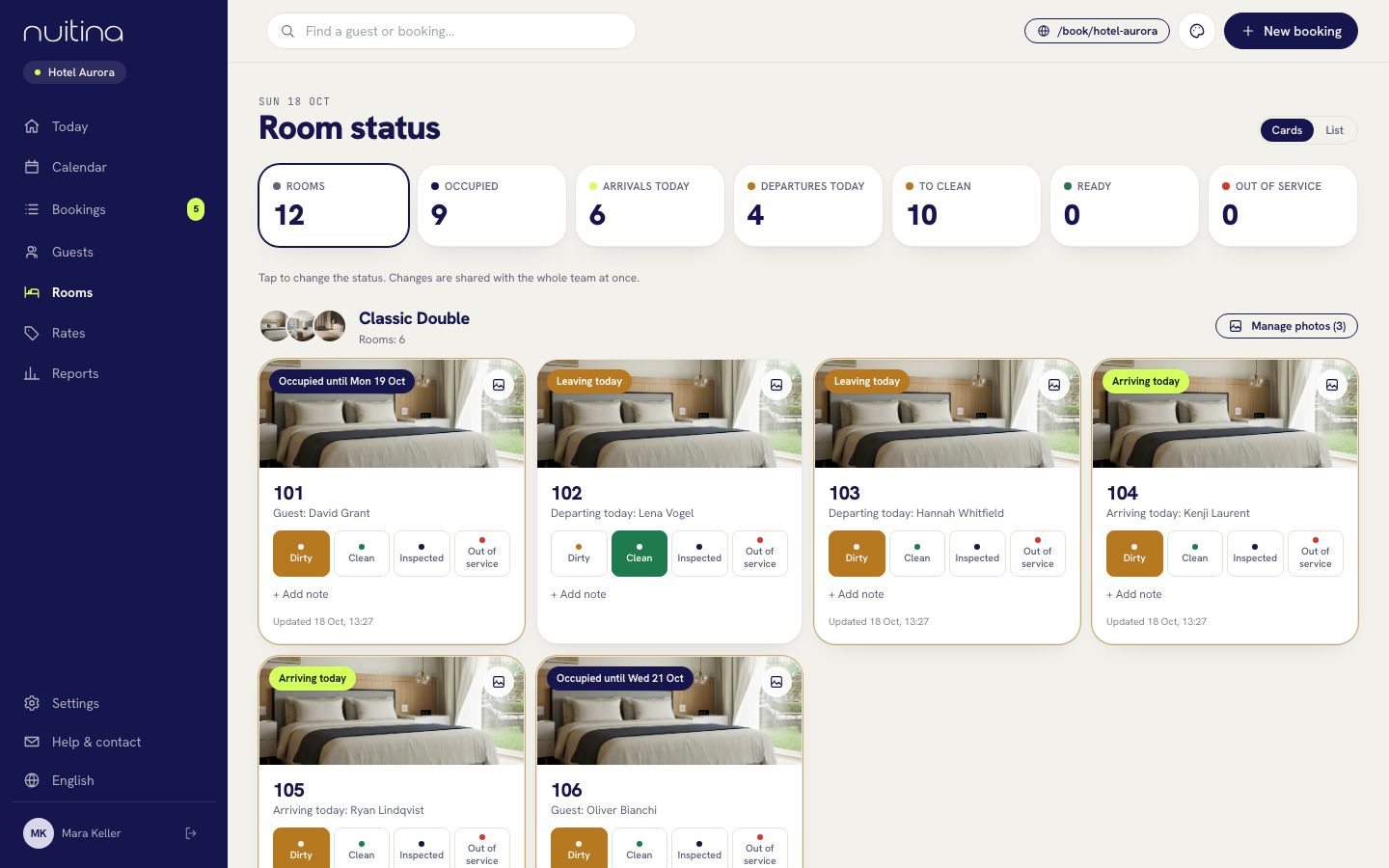
What is on the board
Four cleaning states
Each room is Dirty, Clean, Inspected or Out of service. One tap changes the state, and the change is shared with the whole team immediately.
Arrivals and departures today
Every card says whether the room is occupied until a date, arriving today or vacant, with the departing or arriving guest's name for today.
Counts at the top
Rooms, occupied, arrivals today, departures today and ready: the morning overview in five numbers.
Notes per room
Add a note such as lamp broken or window sticks. The next person who opens the room sees it.
Room photos
Upload up to six photos per category. The first is the cover, and the same photos appear on your booking page.
Cards or list
Switch between cards, which suit a phone in the corridor, and a compact list for the desk.
A normal day
Morning: see what leaves
Housekeeping opens Rooms and sees which rooms are departing today and which are arriving, so the order of work is clear.
During the day: mark rooms
After cleaning, a room goes from Dirty to Clean. A supervisor can then set it to Inspected.
Front desk sees the result
Reception looks at the same board and knows which rooms are ready before the first guest arrives.
Roles and what they see
Every person has their own login. Owners and managers manage everything, reception books and checks guests in, and housekeeping only sees the room status.
Add people under Settings → Team. Read team and roles for how each role works.
Questions people ask
Can my cleaners use it on a phone?
Yes. The back office runs in any browser and can be added to the home screen like an app.
What can a housekeeping login see?
Only the room status. Owners and managers decide who gets which role.
Do changes show up for everyone straight away?
Yes. A change of status is shared with the whole team at once, so reception and housekeeping work from the same board.
Does it cost extra?
No. Housekeeping is part of the one plan, see pricing.
Related
Team and roles
Give every person their own login and choose one of four roles: owner, manager, reception or housekeeping. See what each role can open and do.
Read moreOnline check-in
Guests fill in the registration form online before they arrive. Add upsells at booking and friendly e-mails before and after the stay.
Read moreRooms and prices
Add room categories, rooms and photos, then set base prices, seasons, weekends, minimum stay, stop-sell, tariffs and extras.
Read moreGive your cleaning team a board
Add your rooms and invite a housekeeping login in the free 30-day trial.