Add your team and choose the right roles
At the end everyone who works in the house has their own login and sees only what they need. Adding a person takes about two minutes.
Before you start. Only the owner can add people, change roles and set passwords. You need each person's name and e-mail address. Think of a starting password with at least 10 characters.
Add a person
Open the team
Go to «Settings → Team». The list shows everyone who has a login, with their role.
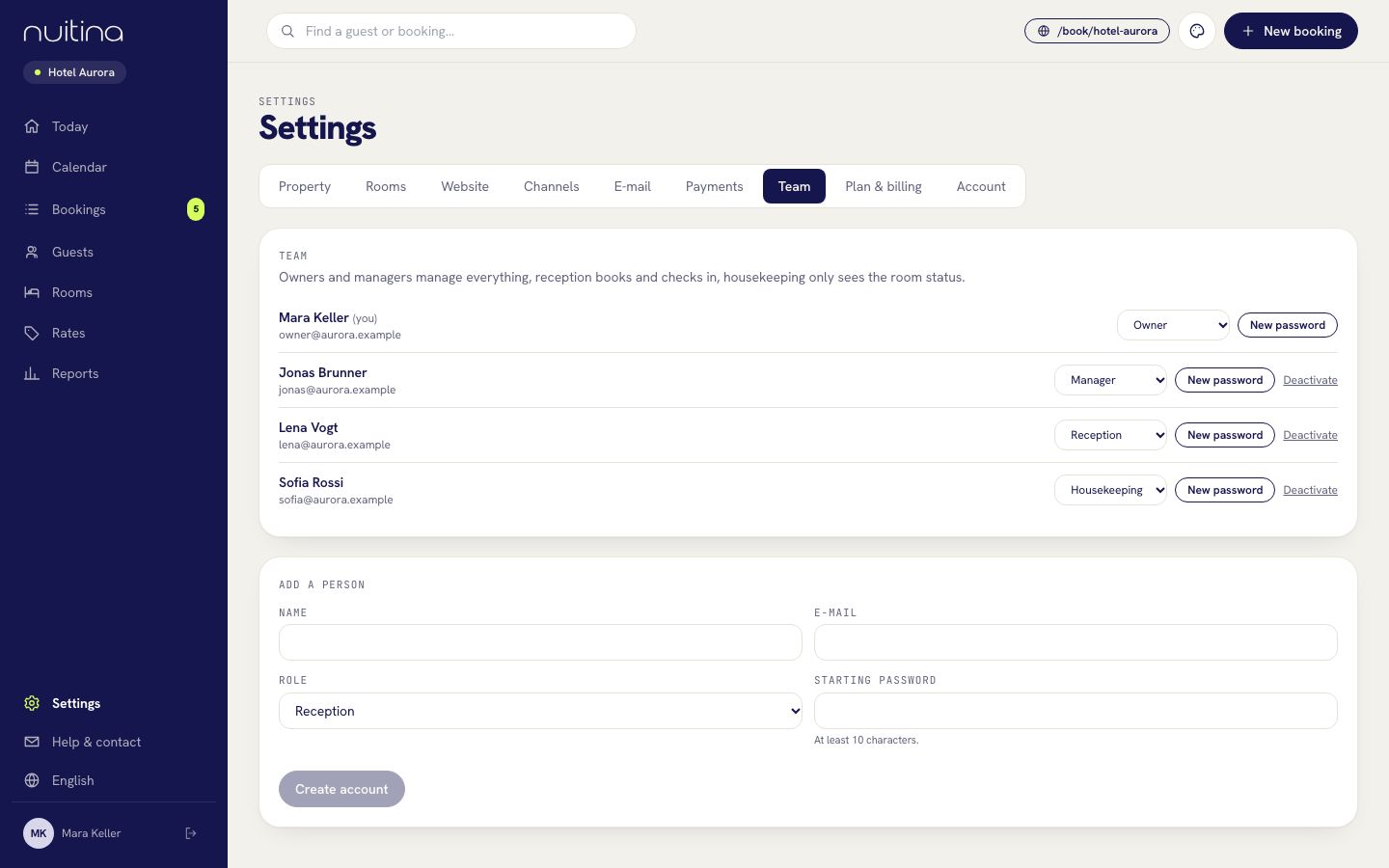
Fill in the person
Under «Add a person» type the «Name» and the «E-mail» of the new person.
Choose the role
Pick a «Role»: Manager, Reception, Housekeeping or Owner. The table below shows what each role can do.
Set a starting password
Type a «Starting password» of at least 10 characters. «Create account» switches on once name, e-mail and password are filled in. Click it.
Hand over the login
Give the person their e-mail address, the starting password and the sign-in address booking.nuitina.com/login yourself. On the sign-in page, «Forgot your password?» lets them choose their own password by e-mail.
Change or switch off a login later
In the list, the role menu changes a role at once. «New password» sets a new password. «Deactivate» locks a person out and signs them out; «Activate» brings them back. At least one owner must remain.
What each role can see and do
| Owner | Manager | Reception | Housekeeping | |
|---|---|---|---|---|
| Today, Calendar, Bookings, Guests | Yes | Yes | Yes | No |
| Create and edit bookings, record payments, check in and out, block rooms | Yes | Yes | Yes | No |
| Rooms: see the room board, set cleaning status, add notes | Yes | Yes | Yes | Yes |
| Rooms: manage room photos | Yes | Yes | No | No |
| Rates and Reports | Yes | Yes | No | No |
| Settings: Property, Rooms, Website, Channels, E-mail, Plan & billing, Account | Yes | Yes | No | No |
| Delete a recorded payment, reopen a stay after check-out | Yes | Yes | No | No |
| Settings: Payments and Team, add people, subscribe | Yes | No | No | No |
Housekeeping lands on the room board when signing in and sees no other menu item.
Housekeeping on the phone
Housekeeping staff open booking.nuitina.com/login on their phone and sign in. They land on «Room status»: each room shows who is leaving, who arrives and who stays. They tap one of four states: «Dirty», «Clean», «Inspected» or «Out of service». «Add note» records things such as a broken lamp. Changes are shared with the whole team at once, and the board refreshes itself every 45 seconds. Tell them to add the page to the home screen, so it opens like an app.
Give every person their own login, and do not share one. When someone leaves, deactivate their login: nothing else changes for the rest of the team.
Questions people ask
How many people can I add?
Up to 30 logins per house. The price depends on rooms, not on people. See pricing.
Can a manager add people?
No. The «Payments» and «Team» tabs are for the owner only. A manager runs the house day to day, including rates, reports and most settings.
Can I have two owners?
Yes. Add a person and choose «Owner», or change a role in the list. Choose carefully: an owner can see payments settings and manage the team.
Does housekeeping see guest data?
The room board shows guest names for rooms that are leaving, arriving or occupied. Housekeeping has no access to bookings, guests, rates or reports.
Related
Housekeeping
A room board for the cleaning team: which rooms are dirty, clean or inspected, who leaves today, who arrives, with notes and room photos.
Read moreRooms and prices
Add room categories, rooms and photos, then set base prices, seasons, weekends, minimum stay, stop-sell, tariffs and extras.
Read moreOnline check-in
Let guests fill in their registration before they arrive: how they get the link, what they enter, where you see it and how to print the registration form.
Read moreStuck? Write to us
Tell us who works in your house and we will suggest the roles.