Connect Airbnb to Nuitina
At the end a night booked on Airbnb is blocked in Nuitina, and a night booked in Nuitina is blocked on Airbnb. Plan about 15 minutes for the first listing.
Before you start. Create your rooms in Nuitina first, and sign in as owner or manager. Airbnb works per listing, so each listing is linked to one Nuitina room. Only availability is synchronised, not prices or descriptions. Airbnb describes its side in Sync your Airbnb calendar to other websites.
Connect one listing
Open the calendar settings in Airbnb
On a computer, click «Calendar» and choose the listing. Click «Availability», and under «Connect calendars» click «Connect to another website». The Airbnb app has similar steps; the help page above shows them.
Copy Airbnb's calendar link
Airbnb shows its own calendar link there, the one you give to other systems. Copy it.
Add it in Nuitina
Open «Settings → Channels». Under «Read the channels' calendars», choose the room, choose «Airbnb» in the second box, paste the link into the field and click «Add».
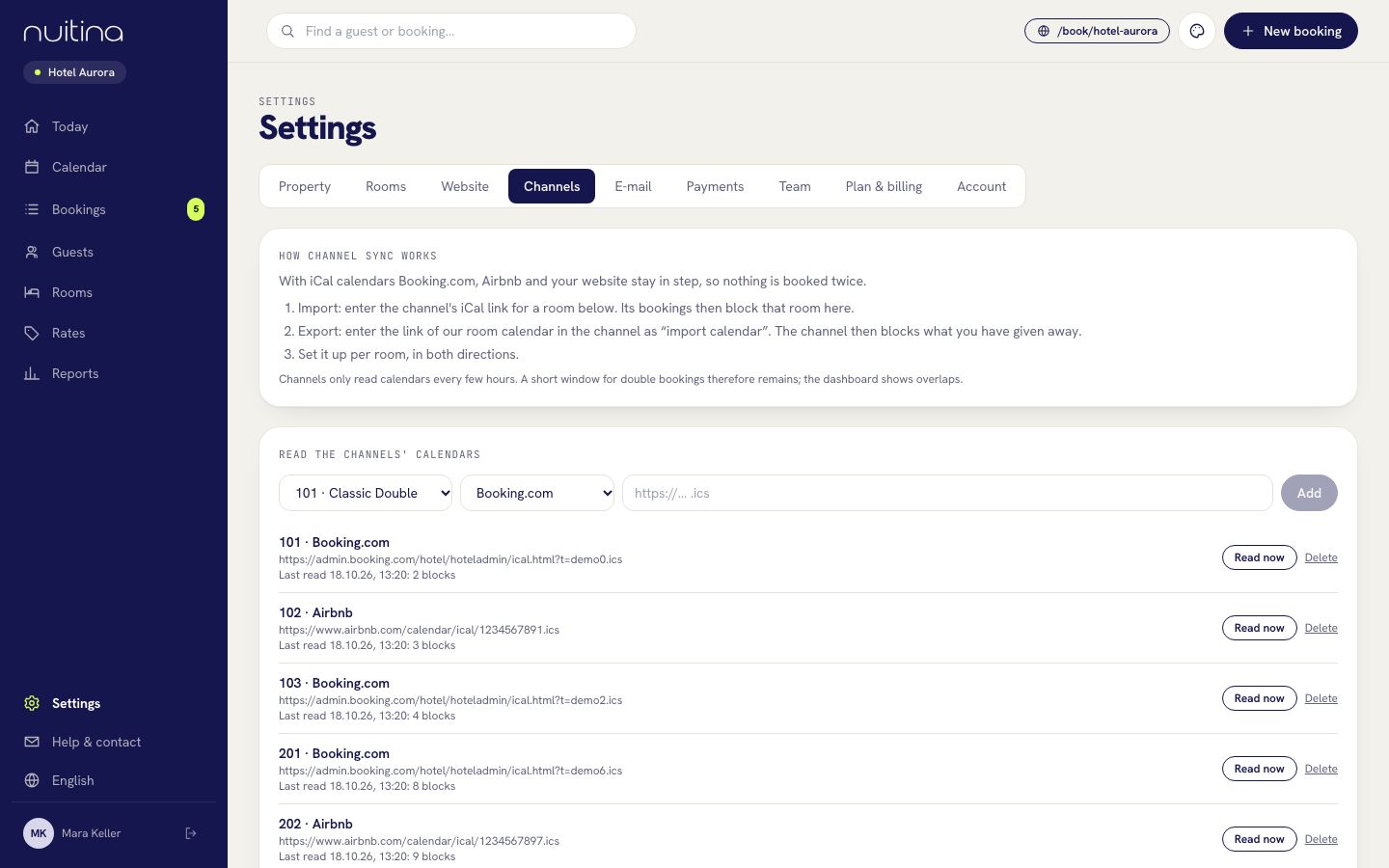
Check the line
The listing shows up with «Last read … blocks». If a red message appears, copy the link again. «Read now» reads it again immediately.
Copy the Nuitina link
Under «Our calendars for the channels», copy the secret link of the same room. It ends in .ics, which Airbnb requires, and holds no guest names. Below it Nuitina also shows a longer link «For Airbnb (without its own bookings)». Use the plain link unless Airbnb accepts the longer one.
Paste it into Airbnb
Back in Airbnb under «Connect to another website», paste the Nuitina link into the calendar address field, give the calendar a name such as Nuitina and click «Add calendar».
Repeat for each listing
Match every Airbnb listing with one Nuitina room, and do both directions for each pair.
Test with a far-away night
Block that room in Nuitina's calendar for one night months ahead («Block room»). In Airbnb, click «Refresh Calendar» on the Nuitina calendar and look at the night. Remove the block afterwards.
How long until it shows
Nuitina reads the Airbnb calendar about every 10 minutes. Airbnb reads Nuitina's calendar on its own schedule: its help page says an Airbnb calendar updates about every 3 hours, and you can press «Refresh Calendar» to check sooner, though Airbnb limits how often. A night booked at either end can therefore be sold again at the other end for a short time.
The overlap warning. When a night is booked in Nuitina and the Airbnb calendar blocks the same night, you see a red «overlap(s) with your own bookings» on that line in «Settings → Channels» and a note under «To check» on «Today». Nothing is cancelled for you. Decide which guest keeps the night, then move the other booking to a free room or contact the guest. Airbnb has its own rules for cancelling a reservation.
Questions people ask
Can I disconnect Airbnb again?
Yes. In Nuitina click «Delete» next to the Airbnb line in «Settings → Channels»; its blocks disappear from your calendar. In Airbnb, choose «Edit» and then «Disconnect Calendar» on the Nuitina calendar.
Does Airbnb show my Nuitina prices?
No. Nuitina sends only which nights are taken. Prices and descriptions stay in Airbnb.
Why does Airbnb say the link is invalid?
Airbnb needs an address ending in .ics. Use the plain room link from «Our calendars for the channels», not the longer one with an extra part at the end.
Do guest names travel between the two?
No. Nuitina's calendar link contains occupancy only, no names. Imported nights show in your calendar as blocked, from the channel calendar.
Related
Connect Booking.com
Import your Booking.com calendar per room and export Nuitina's room calendars, so a night sold on one side is blocked on the other.
Read moreChannel sync
Keep Booking.com, Airbnb and other portals in sync with your calendar over iCal, in both directions and per room.
Read moreiCal calendar sync: why double bookings happen and how to avoid them
How iCal calendar sync works, why portals refresh only every few hours, and the habits that keep a small hotel clear of double bookings.
Read moreStuck? Write to us
Tell us what Airbnb shows you and we will find the right step.