Connect Booking.com to Nuitina
At the end a night sold on Booking.com is blocked in Nuitina, and a night booked in Nuitina is blocked on Booking.com. Allow about 15 minutes for the first room, less for the next ones.
Before you start. Your rooms must exist in Nuitina, and you need the owner or manager login plus access to your Booking.com extranet. Nuitina syncs availability only: prices and descriptions stay in Booking.com. Booking.com does not offer calendar sync to every property; its help page on calendar sync lists the conditions.
Connect one room
Find the calendar sync in Booking.com
In the extranet, look for «Rates & Availability», then «Calendar», then «Sync calendars». Menu names change from time to time, so look for the page where you can import or export a calendar. Booking.com explains it on the help page linked above.
Copy Booking.com's calendar link
There you find a link to the iCal calendar of the room (often a «Copy link» button). Choose the room that matches the Nuitina room, and copy its link. If you are asked what to include, booked dates are what Nuitina needs.
Paste it into Nuitina
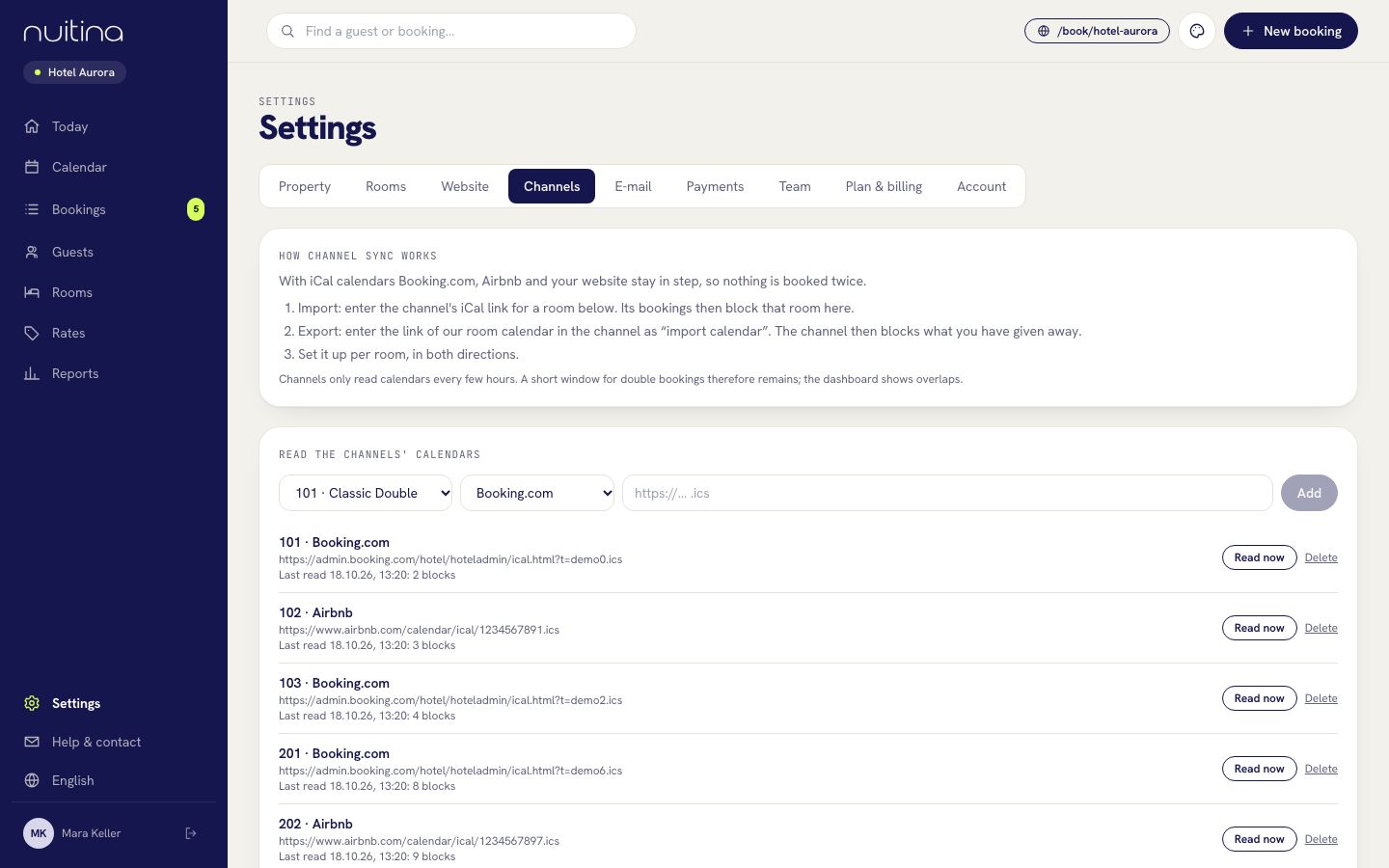
Open «Settings → Channels». Under «Read the channels' calendars», choose the room, choose «Booking.com» in the second box, paste the link into the field and click «Add».
Check that it was read
The room now appears in the list with a line such as «Last read … blocks». A red message means the link did not work; copy it again. Click «Read now» to read it again at once.
Copy Nuitina's calendar link
Scroll to «Our calendars for the channels». Each room has a secret link without guest names. Under it you find a line «For Booking.com (without its own bookings)». Copy that link, so Booking.com does not get its own bookings back.
Paste it into Booking.com
Back on the calendar sync page of the extranet, add a calendar connection (in Booking.com's words, something like «Add calendar connection») and paste the Nuitina link. Name it Nuitina and save.
Repeat for each room
Sync works per room, in both directions. Match every Nuitina room with one Booking.com room.
Test with one far-away night
In Nuitina's calendar block one room for a night months ahead («Block room»). Check Booking.com after a few hours: that night should be closed. Then remove the block again.
How long until it shows
Nuitina reads imported calendars about every 10 minutes, so a Booking.com sale reaches your calendar quickly. In the other direction Booking.com decides: it does not sync in real time and reads the link only every few hours. In between, the same night could be sold twice.
What the overlap warning means. If a night is booked in Nuitina and also arrives from Booking.com, the channel row shows «overlap(s) with your own bookings» in red, and «Today» lists it under «To check». Nuitina cancels nothing by itself. You decide which booking stays: move one guest to another room, or write to the guest.
Questions people ask
Does Nuitina send my prices to Booking.com?
No. Only availability is synchronised. Keep prices, photos and descriptions in Booking.com.
Is this a live connection to Booking.com?
No. It is calendar sync over iCal, so availability follows within a few hours. That is why a short window for overlaps remains.
I cannot find the calendar sync in my extranet.
Booking.com does not offer it to every property, and menus change. Check the conditions on their help page, or ask Booking.com's partner support.
Do I need both import and export?
Yes. Import closes in Nuitina the nights that Booking.com sold. Export closes on Booking.com the nights that you sold. You need both to avoid double bookings.
Related
Connect Airbnb
Link each Airbnb listing with a Nuitina room through two iCal calendars, so a night booked on Airbnb or in Nuitina is blocked on the other side.
Read moreChannel sync
Keep Booking.com, Airbnb and other portals in sync with your calendar over iCal, in both directions and per room.
Read moreiCal calendar sync: why double bookings happen and how to avoid them
How iCal calendar sync works, why portals refresh only every few hours, and the habits that keep a small hotel clear of double bookings.
Read moreStuck? Write to us
Tell us what you see in your extranet and we will help you find the right page.